FOOD AI GUIDE
How to Count Calories From a Photo
Count calories from a photo by showing the full meal, checking the visible foods, reviewing the portion estimate, and saving the result. A photo is a useful starting point when weighing every ingredient is impractical.
Show the whole meal, identify the visible foods, review the portion estimate, and save only after checking sauces, drinks, and obvious omissions.
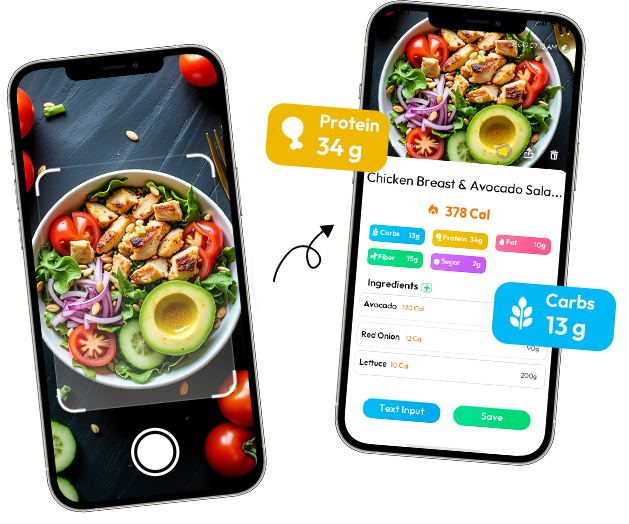
PHOTO → ESTIMATE WORKFLOW
Keep the plate in frame, use reasonable light, and avoid covering one food with another.
Separate obvious components and treat mixed dishes as an estimate based on what can be seen.
Use visible foods and portion clues to review estimated calories, protein, carbs, and fat.
Check the result against the meal you actually ate, then log it for later tracking.
Food Photo Logging: Take Better Photos for Accurate Calorie Tracking
If you track meals, count calories, or manage your fitness, food photo logging can save time when weighing every takeout meal, restaurant dish, or snack is not realistic. A quick photo is useful—but only when you know what makes the image usable, when another method is better, and what details need review.
Two people can photograph similar meals and receive very different results. The difference is often not the app. It is whether the full serving is visible, whether portions are clear, and whether the user checks details that a picture cannot reveal.
What Makes a Food Photo Valid for Tracking
Food photos do not need to look beautiful. They need to look clear enough to judge the serving. Avoid tight crops, heavy filters, and angles that hide food. The useful question is simple: if someone saw only this frame, could they tell what was served and roughly how much of it was there?
Shoot the full plate or bowl
Capture the entire serving with as little overlap as possible. A full plate of grilled chicken beside a complete bowl of rice gives more useful context than a close-up of sauced chicken with the rice cropped out.
Include sides, sauces, drinks, and extras
If you consume it, include it in the frame: dipping sauce, side vegetables, soup, toppings, and drinks. Small additions can materially change the meal estimate. A salad with dressing on the side is not the same logging problem as a salad already coated in dressing, so keep the container or sauce cup visible when it matters.
Use ordinary light and skip filters
Soft indoor light or window light is usually enough. Dark photos, backlighting, and color filters can hide ingredients and make visual judgment harder. A photo cannot reliably reveal whether food was baked, boiled, or fried, so preparation still needs review.
Photograph your own portion
For a shared meal, take a separate photo of your plate. A table-wide image records the occasion, but it does not show how much reached your serving.
Retake photos that hide too much
Blurred, very dark, or heavily blocked images produce little useful evidence. Retake the photo before eating when the portion is still visible.
How App Photo Estimation Actually Works
Food apps cannot weigh a meal through the screen. A photo-based estimate generally starts by identifying visible foods, approximating the portions shown, and matching those clues with nutrition reference data. The result is an estimate, not a final measurement.
Recognition and calorie estimation are separate judgments. The app may correctly recognize chicken, rice, avocado, and sauce while still needing your help with the details that change the result: grilled or fried, a thin layer of rice or a packed bowl, a teaspoon of sauce or several spoonfuls.
Review the meal name, visible ingredients, preparation method, and portion before saving. That short check can correct obvious mismatches, but it cannot reveal every hidden ingredient or exact serving weight.
When Photo Logging Works Best
Photo logging is most useful when precise information is unavailable and manual rebuilding would be a burden. Restaurant meals, takeout bowls, mixed bento boxes, leftovers, and unfamiliar combinations are practical examples. The photo preserves what was actually on the plate instead of relying only on memory.
Consider a work lunch bought from a deli. You may know it was a chicken grain bowl, but not the amount of oil in the vegetables or the recipe behind the dressing. Taking one clear photo gives you a record to review while the meal is still fresh, instead of trying to reconstruct it later from a vague memory of “some chicken and rice.”
When You Should Not Use Photo Logging
Photo logging is a shortcut, not a precision tool. For packaged food, use the nutrition label when available. For measured home cooking or meal prep, ingredient-based calculation is more controlled. For a repeat breakfast, a verified saved meal is often faster and more consistent than taking a new photo every day.
That does not make the photo method useless; it gives each method a sensible job. Use the label when the manufacturer has already measured the product, a recipe calculation when you control the ingredients, and a photo when the meal is unfamiliar or difficult to enter without interrupting your day.
Real-World Example: How to Fix Photo Estimates
Take grilled chicken, rice, avocado, and sauce. Check whether the chicken was truly grilled or breaded, whether the rice filled a full bowl or a thin layer, and whether the sauce was eaten or left aside. The camera can organize visible components; you supply the details about preparation and what you actually finished.
The same review applies to a takeout curry. The photo may show chicken, vegetables, rice, and a glossy sauce, but it cannot tell you how much coconut milk or oil went into the pan. You do not need to invent a perfect number. You need to notice the uncertain part, choose the closest useful description, and keep the estimate consistent with what you actually ate.
Photo Results Are Drafts, Not Final Answers
Do not save an auto-generated result blindly. Ask three quick questions: Was the bowl full or partly eaten? Was the meat grilled or fried? Did I use the sauce? A reviewed estimate is more useful than a clean-looking number that describes a different meal.
Photos Are Shortcuts, Not Measuring Tools
Use photos for unknown restaurant and takeout meals where exact measurement is unavailable. Use labels and weighed ingredients when the information exists. The strongest tracking routine combines methods instead of forcing every meal through one workflow.
Final Takeaway
A useful calorie estimate is one you can review, adjust, and apply consistently to difficult meals. Clear photos help, but honest review matters just as much. The goal is not perfect-looking numbers; it is a realistic record you can keep using.
What to carry into your next meal
A useful estimate is not the number that looks most scientific. It is the one you can inspect against the plate, adjust when needed, and use consistently on meals that are otherwise hard to record.
FOOD AI PRODUCT NOTE
Start with the meal in front of you
Food AI can identify visible meal components and provide a calorie and nutrition estimate to review before logging.
Explore the relevant Food AI tool →