FOOD AI GUIDE
How to Track Macros From a Photo
A photo does not produce macros independently of the food estimate. It starts with visible food recognition, then gives you nutrition information to review and log.
A meal photo can start an estimate of calories, protein, carbs, and fat. Review the food and portion first because the macro numbers depend on those inputs.
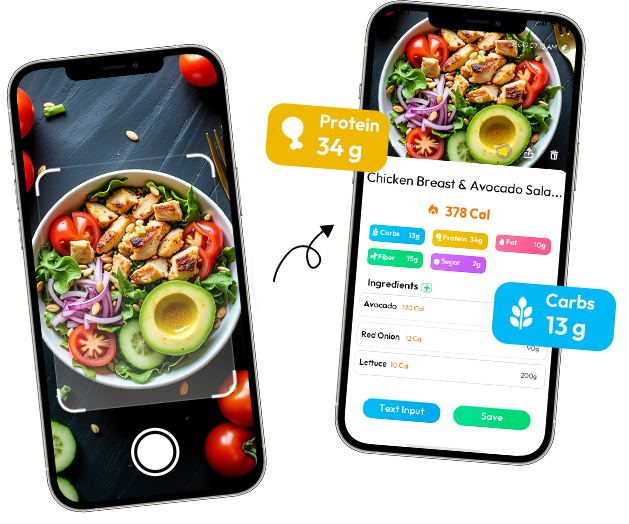
MEAL NUTRITION BREAKDOWN
Chicken rice bowl
530 kcal- Protein
- 34 g
- Carbs
- 62 g
- Fat
- 16 g
Calories and macros answer different questions
Calories give you a single energy estimate. Macros describe where that estimate comes from: protein, carbohydrates, and fat. Looking at both can make a meal easier to understand, but the numbers are only as useful as the food and portion assumptions behind them.
A chicken rice bowl is not just “530 calories.” Its protein may come mainly from chicken, carbohydrates from rice, and fat from cooking oil, avocado, or dressing. If the chicken is breaded instead of grilled, or the rice is fried instead of plain, the balance changes even when the meal looks familiar.
Calories are the broad energy estimate; macros help describe the meal behind that estimate. Protein is usually tied to meat, eggs, dairy, beans, or tofu. Carbohydrates often come from rice, bread, pasta, fruit, and sweetened sauces. Fat can arrive through oil, cheese, nuts, dressing, and frying. The breakdown gives the entry more context.
Why recognition comes before macro tracking
A photo-based macro estimate starts with recognizing what is visible. The system needs a reasonable idea of the foods before it can match them with nutrition information. It is not measuring protein, carbs, and fat independently through the screen.
That is why preparation details deserve a quick review. Plain yogurt with fruit is different from yogurt covered with granola and honey. A burrito bowl may contain rice, beans, cheese, meat, guacamole, and dressing, but the camera cannot reliably know the exact amount of each layer. The image organizes the meal; your review supplies the context.
Small wording differences can matter. Chicken does not tell you whether the piece was grilled, breaded, or cooked in a creamy sauce. Rice does not tell you whether it was steamed, fried, tightly packed, or served as a loose scoop. Recognition gets you close enough to inspect; your review supplies the detail.
Mixed dishes need more judgment
Separate foods are easier to inspect than blended recipes. A plate with grilled chicken, a visible scoop of rice, and sliced avocado gives you distinct visual anchors. A curry hides ingredients in its sauce. A casserole combines several foods in every bite. Pasta may contain oil, cream, cheese, and meat that are not obvious from the top.
For these meals, look for the parts that change the result most: the main protein, the starch, rich sauces, added cheese, and the size of the serving you actually ate. You do not need to identify every herb to make a more sensible review. Focus on the ingredients that carry the biggest uncertainty.
Consider a curry served over rice. The chicken and rice may be easy to name, while coconut milk, oil, and the amount of sauce cling to the food rather than sitting in a separate pile. A casserole has the same problem: each forkful may contain pasta, cheese, meat, and sauce in a ratio the photo cannot reveal.
Example: a chicken rice bowl
Suppose a photo result shows a chicken rice bowl at 530 kcal, with 34 g protein, 62 g carbs, and 16 g fat. Treat this as a draft. Is the chicken grilled or coated? Is the rice a compact cup or a loose half-bowl? Is the sauce spread across the meal or left on the side? Did the bowl include avocado or cheese?
If the chicken portion was smaller than the estimate, protein may be overstated. If the rice was packed tightly, carbohydrates may be higher. If the sauce was barely touched, fat and calories may need to come down. The goal is not to invent a more precise number; it is to make the record match the meal you remember eating.
Now compare that with plain yogurt, berries, and granola. A light sprinkle and a full handful can look similar from above. If honey or nut butter was added, include it in the review. Correct the one or two ingredients most likely to change the estimate instead of rebuilding a familiar breakfast from scratch.
Review before saving
Before saving, check the meal name and the obvious components first. Then check the serving size and preparation method. Finally scan for the easy-to-miss extras: dressing, oil, cheese, sweet drinks, and toppings.
- Does the meal name describe the actual dish?
- Is the main protein represented correctly?
- Is the starch portion realistic?
- Are sauces and toppings included only if you ate them?
- Does the serving reflect the whole bowl, half the bowl, or leftovers?
When a photo is a useful macro shortcut
Photo tracking is most useful for unfamiliar meals, takeout, restaurant plates, and mixed lunches that would be tedious to enter manually. It creates a starting nutrition estimate so you can keep a record instead of skipping the meal entirely.
For a measured meal-prep recipe or a packaged food with a clear label, use the more controlled information. Macro tracking works best when the method matches the situation: photo for speed and visibility, measured data for known ingredients, and a short review whenever the image cannot answer the important question.
A label is usually the better starting point for a protein bar or bottled drink. A weighed recipe is better for a carefully portioned meal-prep container. A photo earns its place when the alternative is skipping a restaurant lunch, guessing at takeout curry, or spending ten minutes searching for every part of an unfamiliar bowl.
What the log is really for
A macro log is not a promise that every gram is exact. It is a way to notice what a meal contains and how often similar meals appear in your routine. If a bowl repeatedly includes a large sauce or a small protein portion, that pattern is more useful than arguing over a few grams from one photograph.
Food AI can help turn the photo into a reviewable calorie and macro estimate. The useful step is still the same one a careful human tracker would take: look at the result, correct what is plainly wrong, and save what you are comfortable treating as an estimate.
There is also a practical reason to review macros as a group. A change in preparation can affect more than one line at once. Breaded chicken may add carbohydrates and fat while changing the expected protein per serving. Fried rice may contain more oil than plain rice. Granola, cheese, nuts, and dressings can shift the fat total without making the plate look dramatically different. Look for these high-impact details instead of obsessing over tiny ingredients the photo cannot distinguish.
For a meal eaten in a hurry, write one short note before saving: “large rice portion,” “sauce on side,” or “half eaten.” That note keeps the estimate connected to the meal you actually consumed and makes a later review much easier than trying to remember the whole plate.
Keep the result connected to the meal
Macro tracking is most helpful when the entry remains understandable later. A note such as “rice bowl, sauce on side” tells you more than a long list of numbers with no context. If you eat only half the bowl, save the amount you actually finished. If the restaurant adds cheese or the chicken is breaded, update the parts that changed rather than rebuilding the entire meal.
Over time, the value comes from seeing repeated meal patterns: which breakfasts are protein-light, which lunches rely on large starch portions, or which sauces appear often. The photo starts the record; a short review makes the record worth keeping.
Do not let the presence of four macro numbers make the result look more certain than the photo allows. If the portion is unclear, all four values may move together. Record the meal, keep the estimate in context, and use better ingredient information when you have it.
What to carry into your next meal
The breakdown earns its place when it helps you ask better questions about the meal: what is the serving, where is the protein, and which preparation details could move the estimate?
FOOD AI PRODUCT NOTE
Review more than one number
Food AI can identify visible meal components and provide a calorie and nutrition estimate to review before logging.
Explore the relevant Food AI tool →