Calorie scanner app for everyday meals
Calorie Scanner App
Take a meal photo and get a reviewable starting point for calories, protein, carbs, and fat. Food AI is built for the meals that are inconvenient to search item by item: restaurant plates, takeout, mixed dishes, and leftovers.
Get Food AI on the App Store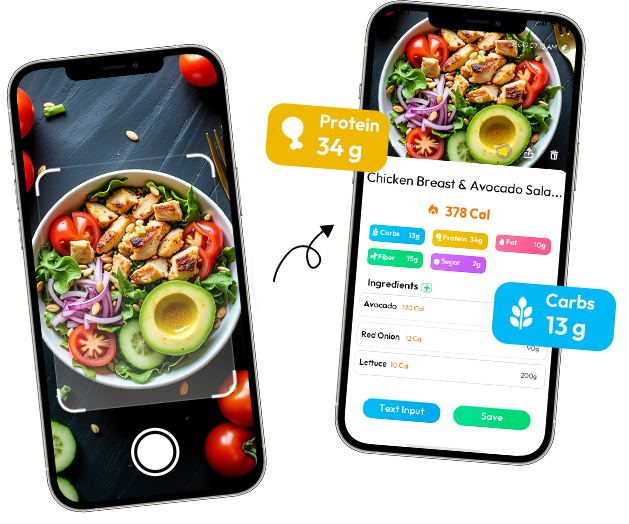
What Should a Calorie Scanner App Do?
A useful calorie scanner should get you from a meal in front of you to a food log you can review. Food AI starts with the photo, identifies visible foods, estimates calories and macros, and leaves room for you to correct the details that only you know.
The result is not a scale or a nutrition label. A picture cannot reveal exact serving weight, hidden oil, every ingredient, or the complete recipe. That limitation is part of the workflow: scan first, review the meal name and portion, then save what fits your actual plate.
The Food AI Scan-and-Review Workflow
- 01Meal photoShow the full meal in a clear frame, including sides, drinks, and sauces.
- 02Visible food identificationReview the foods and components the image can actually show.
- 03Serving cluesUse plate context and visible portions as clues, not as a direct measurement.
- 04Estimated caloriesCheck the meal name, preparation, and portion before saving the result.
What Affects the Estimate?
Photo calorie counting is shaped by what the camera can and cannot see. These factors are why two meals that look similar may still need different review:
Treat the result as approximate. When you know a detail the photo cannot show, use your own review rather than assuming the estimate is exact.
Where a Calorie Scanner Saves Time
A photo can be a faster first step for a meal with several foods, a restaurant plate, or an everyday entry when searching item by item would interrupt the moment. It helps you start the record without pretending that every detail is visible.
That makes it especially useful for takeout, mixed lunches, and leftovers where you know what you ate but not the exact recipe. For a packaged snack or a measured meal-prep recipe, the label or ingredient record usually gives you better information.
Photo, Barcode, or Manual Entry?
Photo starting point
- Less repetitive searching
- Useful for mixed meals
- Review an estimate
Manual entry
- More item-by-item control
- Useful when details are known
- Can record specific weights
These approaches can work together. A photo starts the process quickly; manual review is useful when serving size or ingredients need more detail.
Review Before You Save
The most useful photo estimate is the one you correct with details the camera cannot know. Before saving, take a quick look at:
- Whether the food was grilled, fried, baked, or covered in sauce
- Whether the serving was full, half-eaten, or shared
- Whether a drink, dressing, dip, or extra side belongs in the meal
- Whether the suggested food and portion match what was actually on your plate
For example, a bowl of rice beside grilled chicken may be easy to recognize, but the result still changes if the rice was packed tightly, the chicken was breaded, or the sauce was left untouched.
Calorie Scanner App FAQ
Can you count calories from a photo?
Food AI can estimate calories from a meal photo by identifying visible foods and meal components.
How accurate is a photo calorie estimate?
The result varies with the photo, serving size, ingredients, and preparation details. It is an estimate, not an exact measurement.
Why does portion size matter?
The same food can represent different amounts. A photo provides clues, but it may not show exact weight or serving size.
Can oils and sauces affect estimates?
Yes. Oils, sauces, fillings, and ingredients hidden by other foods may not be visible in the image.
When is manual entry more useful?
Manual entry can be more useful when you know exact ingredients, portions, or preparation details that the photo cannot show.
Try Food AI With Your Next Meal
Take a photo when typing every ingredient would make you skip the log. Review the result, adjust what the image cannot show, and keep the meal with your daily tracking.
Get Food AI on the App Store